
.png)


Lumens
VC-IR01
Add paragraph text. Click “Edit Text” to update the font, size and more. To change and reuse text themes, go to Site Styles.
Main Features
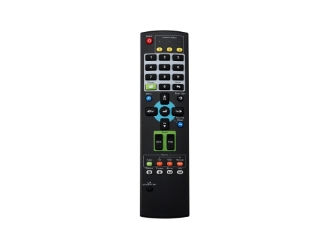
Compatible with VC-BC301P and all Lumens PTZ cameras, easy to control the camera with one hand.
Keys include all common functions like pan, tilt, zoom, presets, and focus
Technical Specification
Thông số kỹ thuật | Chi Tiết |
|---|---|
Loại thiết bị | Điều khiển từ xa hồng ngoại cho camera PTZ Lumens VC Series. |
Công nghệ điều khiển | Infrared Remote Control (IR). |
Chức năng điều khiển | Pan, Tilt, Zoom, Focus, Preset, Menu Control. |
Ứng dụng | Điều khiển camera PTZ Lumens từ xa. |
Tương thích | Lumens VC Series PTZ Cameras. |
Thiết kế | Handheld IR remote controller. |
Product Overview
Lumens VC-IR01 là remote điều khiển hồng ngoại dành cho camera PTZ và POV, cho phép người dùng thao tác nhanh các chức năng cơ bản như pan/tilt/zoom, focus và preset mà không cần controller chuyên dụng. Thiết bị hướng đến sự đơn giản, dễ sử dụng và phù hợp với các hệ thống nhỏ hoặc người vận hành không chuyên.
Với phạm vi điều khiển khoảng 5–10 mét, VC-IR01 đáp ứng tốt các môi trường như phòng họp, lớp học, studio nhỏ, nơi camera đặt gần người vận hành. Thiết kế gọn nhẹ và thao tác một tay giúp việc điều khiển trực tiếp trở nên nhanh chóng, đặc biệt trong các tình huống cần điều chỉnh góc quay hoặc zoom ngay lập tức.
Trong hệ thống AV, VC-IR01 thường đóng vai trò giải pháp điều khiển cơ bản, thay thế cho các controller joystick khi không cần hệ thống multi-camera phức tạp, giúp giảm chi phí nhưng vẫn đảm bảo khả năng vận hành linh hoạt.